



For distributors that import from other countries, tariffs (aka: customs, duties) were all over the news and on everyone’s lips in 2025. For some, they were here one day and gone the next but, for many others, tariffs were (and still are!) material and should be included in the product cost to allow for accurate analysis.
There seems to be confusion about whether you can benefit from the CSD tariff functionality.
- If your local supplier paid the tariff (they are the importer of record), you likely saw your PO cost increase as they passed on the duty but, your costs are accurate, no further action is required.
- For those that purchase from a foreign vendor ( you are the importer of record), your vendor PO cost is unaffected but, you also have an additional invoice from customs for the tariffs. If you don’t incorporate this duty into your product costs, they will be understated! The good news is, CSD/SX.e has been able to manage tariffs since 2012.
Once setup, CSD tariff functionality allows you to include duties in your average cost and accrue for tariffs payable upon PO Receipt. If you are an exporter, CSD allows printing of a Commercial Invoice (displays HS codes and country of origin for each product).
Here is what needs to be setup in CSD to track product tariffs:
- Confirm the countries you import from are setup in your system (SASTT/W).
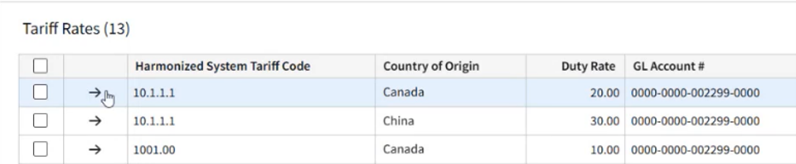
- Setup the HS codes that you import (SASGT) along with the possible countries of origin, applicable duty % and GL code for accruing duties payable, per Figure 1.
- Ensure the vendors you import from are properly setup. The most important is that the vendor country (APSV) is different than your company country (SASC).
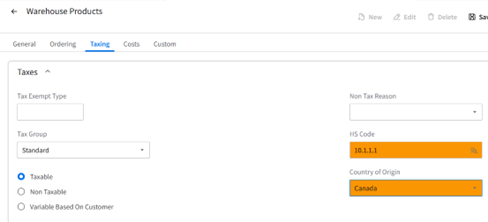
- Review the setup of your products (ICSP, ICSW, ICSC) to ensure applicable products have been assigned an HS code and Country of Origin, per Figure 2.
What you can expect once you setup tariffs:
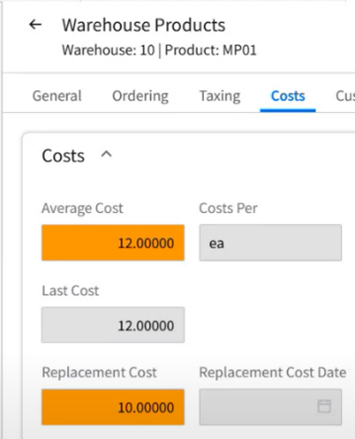
- Upon receiving a foreign vendor PO, the tariff will be included in your average cost and the replacement cost will be unchanged, per Figure 3.
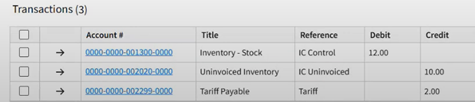
- The tariff fee will be added to the inventory debit and there will be a credit to tariffs payable for the anticipated tariff invoice, per Figure 4.
- Ability for exporters to print a Commercial Invoice from CSD (OEROC).
For more detail including tips and tricks, you I propose you view a webinar I did back in April 2025: NSACOM.COM/NSA-WEBINARS/Webinar Series #71 – How to Manage Tariffs in CSD